Feel · Form · Frame

Built with SwiftUI · CoreHaptics · Firebase

FEEL EVERY
FRAME .

An iOS app that auto-generates haptics from a video using on-device AI — sound classification, optical-flow motion analysis, and spectral DSP all fused — then lets you fine-tune on a Premiere-style multi-lane timeline.

Get the source See the editor
📱 iOS 17+ 🧠 On-device AI 🎬 SwiftUI 🌊 CoreHaptics 🔥 Firebase cloud storage

By the numbers

A production-grade haptic toolkit, in your pocket.

Haptic lanes
3
Dedicated lanes for Tap, Beat, and Hold so events of different types never collide visually.
Playhead refresh
30hz
Smooth scrub without thrashing SwiftUI's render loop or burning battery.
Zoom range
0.5–4×
Pinch to zoom from a whole-video overview down to single-frame precision.
Auto-onset detection
FFT
Spectral-flux analysis flags transients, beats, and sustained sections from raw audio.
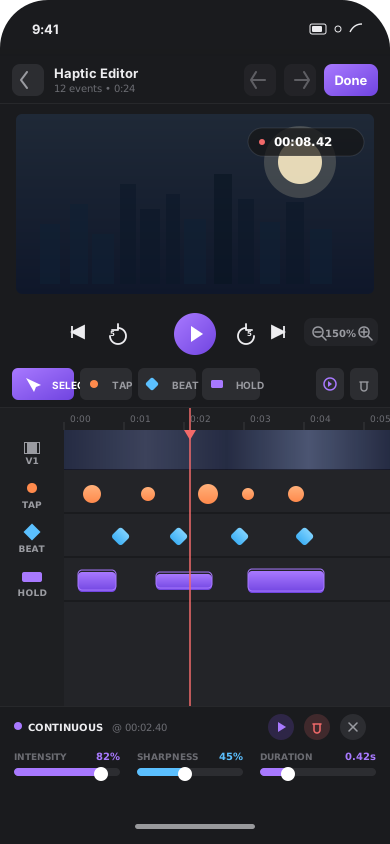
HapticVideoApp editor on an iPhone, showing the video monitor, transport bar, tool palette, multi-lane timeline, and event inspector.

The editor

Premiere Pro, sized for your thumb.

A familiar mobile DAW chrome with a top bar, video monitor with floating timecode, transport row, tool palette, and a multi-lane timeline that locks frames to events.

  • Live timecode pill on the monitor, color-coded with the playback state
  • Tool palette: Select, Tap, Beat, Hold — pick a tool, tap the lane, drop an event
  • Inspector slides up from below with intensity, sharpness, and duration sliders
  • Pinch-to-zoom and tap-to-scrub on the ruler — no thumb-cramp
The timeline

A multi-lane timeline that thinks like a video editor.

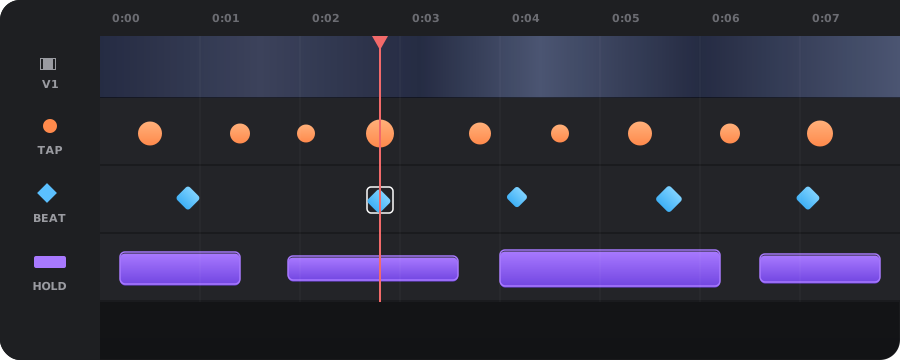
Video on top. Three haptic lanes underneath — one per event type. A sticky left column so you always know what you're editing, even when scrolled three zoom-levels deep.

A wide multi-lane timeline showing the V1 video strip, TAP lane with orange circles, BEAT lane with cyan diamonds, HOLD lane with violet continuous bars, and a red playhead.
Transient (tap) events Impact (beat) events Continuous (hold) events Playhead

The AI pipeline

Three on-device models, fused into one haptic stream.

A pure DSP analyzer is blind to what is happening — it fires on dialogue's bass, misses silent action, and can't tell a snare from a glass break. Phase 1 layers two on-device AI gates on top so the haptics actually understand the video.

VIDEO IN
Frames + audio
Extracted on import. Audio decoded to 44.1 kHz float; video downsampled to 4 fps thumbnails for flow.
CLASSICAL DSP
vDSP FFT · 5-band energy · spectral flux onsets
The original analyzer. Provides energy peaks and onsets. Strong on rhythmic, energetic content.
AudioAnalyzer.swift
SOUND CLASSIFICATION
Apple SNClassifySoundRequest · 300+ classes
Tags every 0.5 s window: speech music gunshot glass explosion
SoundClassifier.swift
OPTICAL FLOW
Vision · VNGenerateOpticalFlowRequest
Per-pixel motion magnitudes between adjacent frames. Catches silent action, foley-less impacts, and visual emphasis.
VideoMotionAnalyzer.swift
FUSION
AIVideoContext · semantic gates and second pass
  • Suppress events when speech ≥ 0.7 (unless an impact class is also firing)
  • Upgrade event type + boost intensity ×1.3–1.6 on gunshot explosion glass slam
  • Add visual-only impact events on motion spikes (μ + 2σ) the audio pass missed
HAPTIC OUT
HapticEvent[]
A semantically-aware haptic timeline. Renders via CHHapticAdvancedPatternPlayer in lockstep with AVPlayer.

Everything above runs on-device using frameworks shipped with iOS — zero API calls, zero cost, zero data leaving the phone. Read the research →

Design philosophy

Feel the cut
Touch first
Frame-true
No friction

Why HapticVideoApp

Designed by an editor. Built by an engineer.

A focused stack of features that get out of your way and let you feel the cut.

🎚️

Multi-lane timeline

One lane per event type so markers never collide. Sticky left header column, adaptive ruler labels, pinch-to-zoom from 0.5× to 4×.

Frame-accurate sync

CHHapticAdvancedPatternPlayer is locked to AVPlayer state. Seeks, edits, and re-edits all re-sync the engine without dropped events.

🧠

AI-powered generation

On-device sound classification suppresses dialogue and upgrades gunshots / explosions / glass; optical-flow adds haptics for silent action; classical FFT catches everything else.

🎯

Three event types

Tap (transient), Beat (impact), Hold (continuous). Each one has intensity, sharpness, and — for holds — a duration slider.

☁️

Cloud storage

Firebase Firestore + Storage means your videos and patterns live everywhere. Share a link, feel the haptics.

📐

Tactile UI

Every button, slider, and event press has its own UIKit haptic. Editing haptics with haptic feedback feels right.

How it works

From silent clip to felt experience in four steps.

01 · IMPORT
Pick a video

Grab any clip from your library or record a new one — HapticVideoApp pulls thumbnails and duration on the fly.

02 · ANALYZE
AI + DSP, on-device

FFT + spectral flux runs in parallel with Apple's sound classifier and Vision optical flow. All three signals are fused into a semantically-aware pattern — dialogue suppressed, impacts boosted, silent action filled in.

03 · EDIT
Fine-tune on the timeline

Drop, drag, tweak intensity. Preview a single event or scrub the whole clip. Pinch to zoom in on the cut you care about.

04 · SHARE
Cloud & feel

Your finished video and its haptic pattern upload to Firebase and become a shareable link for anyone on iOS to feel.

Connected

A video without haptics is half a story. Feel the other half.

Build it yourself.

Clone the repo, open it in Xcode 16+, drop in a Firebase config, and run. The full source for the editor, the timeline, and the audio analyzer is on GitHub.

git clone https://github.com/banthia14aman/HapticVideoApp.git